Navigating APA In-Text Citations: A Comprehensive Guide for College-Level Writers

In academic writing, adhering to proper citation guidelines is crucial to acknowledge the sources of information and ideas used in your work while avoiding plagiarism. The American Psychological Association (APA) style is one of the most widely used citation styles in college-level writing, particularly in the social sciences. Understanding how to format in-text citations in APA style is essential for college-level writers. Here’s a detailed guide with examples to help you master APA in-text citations.

Basic Formatting:

In APA formatting, in-text citations typically include the author’s last name and the publication year of the source. This information is enclosed in parentheses and placed at the end of the sentence or within the sentence itself if the author’s name is mentioned.
Example:
• (Smith, 2019)
• According to Jones (2020), “…”
Author’s Name in the Sentence:
If the author’s name is mentioned in the sentence, only the publication year needs to be included in the parentheses.
Example:
• As Brown (2018) argues, “…”
• Smith’s (2021) research supports this claim.
Multiple Authors:
When a source has two authors, include both names in the citation separated by an ampersand (&). For sources with three or more authors, include only the first author’s name followed by “et al.”
Example:
• (Johnson & Smith, 2017)
• (Brown et al., 2016)
No Author:
If a source does not have an identifiable author, use the title of the work in the citation followed by the publication year.
Example:
• (Title of the Article, 2020)
• (Shortened Title, 2015)
Corporate Authors:
For sources authored by organizations or corporations, use the organization’s name as the author in the citation followed by the publication year.
Example:
• (National Institute of Health, 2014)
• (World Health Organization, 2013)
Multiple Works by the Same Author:
If you cite multiple works by the same author, distinguish between them by including the publication year and, if necessary, lowercase letters to differentiate between multiple works published in the same year.
Example:
• (Smith, 2019a)
• (Smith, 2019b)
Indirect Sources:
If you cite a source that was mentioned in another source (indirect or secondary source), include the original author’s name and the phrase “as cited in” followed by the name of the actual source and the publication year.
Example:
• (Smith, as cited in Jones, 2018)
No Page Numbers:
If a source does not have page numbers (e.g., webpages), omit the page number from the citation.
Example:
• (Brown, para. 5)

Presentations (live or online):
If your instructor requires that you document your source on the references page, do that as well. For in-text specifically for a presentation that you want to use, do it this way:

(Last Name of Presenter, Year)

Example: (Smith, 2023)

If the presenter’s name is unknown, you can use the title of the presentation or simply describe it in parentheses:

(Title of Presentation, Year) or (Presentation on Introduction to Psychology, 2023)

By following these guidelines, college-level writers can ensure their in-text citations are properly formatted according to APA style. Remember to consult the Publication Manual of the American Psychological Association or reputable online resources for more detailed information and examples on APA formatting. Proper citation not only enhances the credibility of your writing but also demonstrates your commitment to academic integrity.

Mastering MLA Formatting: A Guide to Proper In-Text Citations

In academic writing, proper citation is essential to give credit to the sources you use and to avoid plagiarism. The Modern Language Association (MLA) formatting is a commonly used citation style in college-level writing, particularly in the humanities. In MLA style, in-text citations provide brief information about the source directly within the text of your paper. Here’s a guide on how to format in-text citations in MLA style, complete with examples for college-level writers.

Basic Formatting:

In MLA formatting, in-text citations typically include the author’s last name and the page number(s) from the source. This information is enclosed in parentheses and placed at the end of the sentence or within the sentence itself if the author’s name is mentioned.
Example:
• According to Smith, “…” (45).
• “…” (Jones 25).

Author’s Name in the Sentence:
If the author’s name is mentioned in the sentence, only the page number(s) need to be included in the parentheses.
Example:
• As Brown argues, “…” (72).
• Smith’s research supports this claim (33).

Multiple Authors:
When a source has two authors, include both names in the citation. For sources with three or more authors, include only the first author’s name followed by “et al.”
Example:
• (Johnson and Smith 15)
• (Brown et al. 40)
No Author:
If a source does not have an identifiable author, use the title of the work in the citation. If the title is long, shorten it in the citation.
Example:
• (“Title of the Article” 8)
• (“Shortened Title” 25)
Corporate Authors:
For sources authored by organizations or corporations, use the organization’s name as the author in the citation.
Example:
• (National Institute of Health 3)
• (World Health Organization 12)
Multiple Works by the Same Author:
If you cite multiple works by the same author, distinguish between them by including a shortened version of the title in the citation.
Example:
• (Smith, Title of Work 18)
• (Smith, Other Title 42)
Indirect Sources:
If you cite a source that was mentioned in another source (indirect or secondary source), include the original author’s name and the phrase “qtd. in” (quoted in) followed by the name of the actual source.
Example:
• (qtd. in Smith 30)
No Page Numbers:
If a source does not have page numbers (e.g., webpages), omit the page number from the citation.
Example:
• (Brown)
• (Smith par. 5)

By following these guidelines, college-level writers can ensure their in-text citations are properly formatted according to MLA style. Remember to consult the MLA Handbook or Purdue OWL for more detailed information and examples on MLA formatting. Proper citation not only enhances the credibility of your writing but also demonstrates your respect for intellectual property and academic integrity.

Capitalizing Essay Titles (or Report Titles) in APA and MLA

Let’s talk about how to capitalize your title when writing a paper. It’s not terribly complicated, but it can be a bit confusing. If you have picked up any newspaper or looked at (some, not all) a video on Youtube, you’ll see that something isn’t quite right about titles. Newspapers and some online videos tend to capitalize the first letter of the title, proper nouns (for the most part), and the first letter after any colon used in the title. That’s it. The usual formatting for news articles is AP, and tends to write titles as a sentence. That is not the case with academic writing. Seriously! See the “rule” (which may change as the formatting styles update) and an example below.

APA

My personal favorite formatting style uses title casing. So, only minor words in a title should be lowercase. Keep in mind that it gets more complicated when you use headers, table titles, subheadings, etc. Click here to read more. Note that in APA articles (i.e., the), short prepositions (i.e., to) and conjunctions (i.e., and) are not capitalized unless they are at the beginning of a sentence or right after a colon in the title.

Example: Biology Professor at WKU Speaks out on Environmental Issues

MLA

This formatting style is used primarily for people who are in English and other arts-related areas. You are in luck! MLA titles use standard capitalization, which is like APA. For example, note the preposition, article, and conjunction in the following title.

Example: Students Going out to the Ballgame and Dance is Exciting!

Final Thoughts

This article only covers the main titles of research papers and reports. If you are publishing in a professional journal, check the publisher for specific rules – they may differ. Both MLA and APA require capitalization after a colon in a title, regardless of what the word is after it. Think of it as starting a new title. In addition to the above advice, always capitalize proper nouns in titles, and you should be good to go. Note that there are always exceptions to capitalization rules (okay, may not always). For college students, high school students, and others, check with instructors to ensure they are not using variations in your formatting styles. It is not unheard of for an instructor to tell students to use MLA or APA and add a “but” at the end because they have a personal preference about something. So, double-check. Other than that, capitalizing your title in your essay or report is easy as pie!

Using Boolean Phrases & Other Simple Search Techniques for Research

Boolean operators can help students, faculty, and other people conduct research with a bit more ease. Using Boolean operators coupled with using synonyms for your search terms can reduce stress and ensure that you are getting the maximum benefit from your research time.

AND

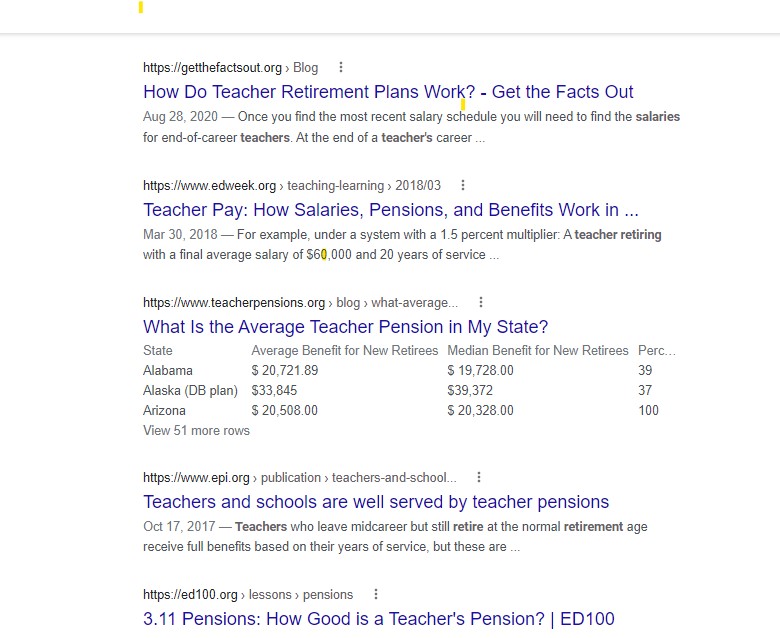
AND is one of the most common Boolean operators. Using AND can narrow a search by combining terms. For example, combining terms such as those below will result in search documents and other resources with all of the terms in the returned search items.

teacher AND pay AND retirement

Google search entered
Picture of search results – note the combination of ideas in the same documents.

OR

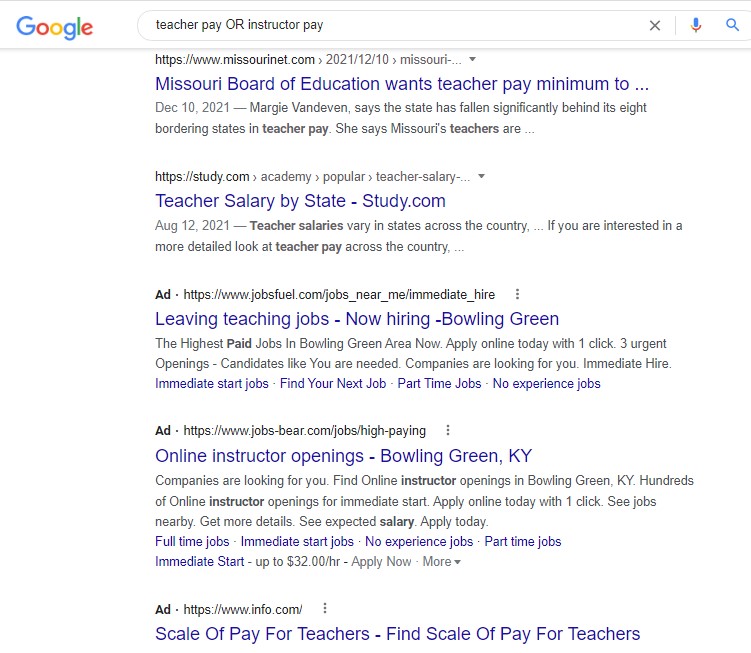
OR is a Boolean operator that broadens a search. It can be used with synonyms or with unrelated terms. For example, if the search is as shown below, the search engine will find results about teacher OR instructor pay. Simple and effective.

teacher pay OR instructor pay

Truncation

Truncation is a research technique that typically uses an asterisk. The asterisk is added to a word to search for other words that are similar but have different endings. This works especially for most databases. Please note that some databases use different symbols, so contact the library when in doubt. Most college libraries can tell you what symbol is used.

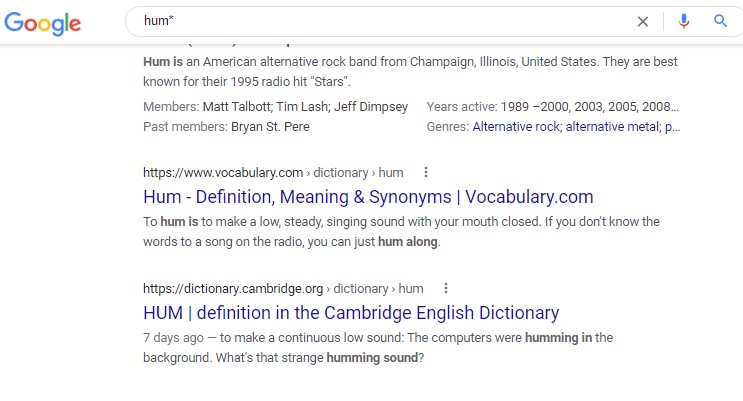
An example of using the asterisk for research is: hum* “Hum with an asterisk will tell the search engine to search for words that have “hum” in them. This my or my not work for search engines. For example, consider the search below.

Searching with an asterisk found “hum” and “humming.”

Wildcard

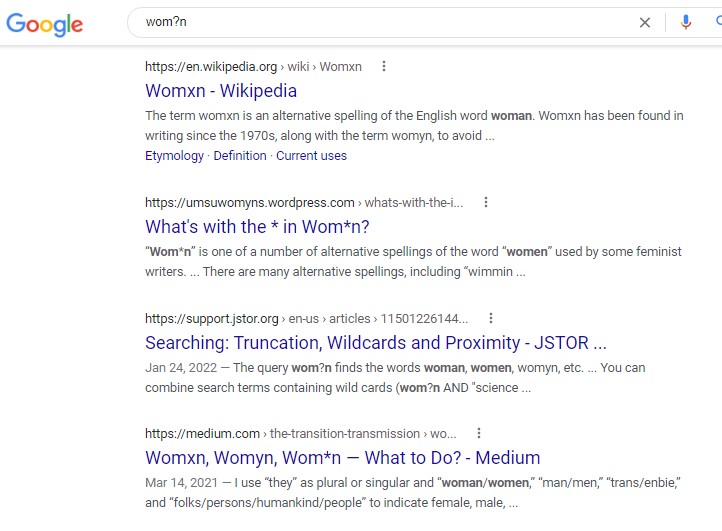
A wildcard is used to replace a letter in most database and search engine searches. Most of the time, the ? symbol can be used to replace a letter in a word to yield a wider range of words by replacing the ? with different letters in the search results. Note that # may also be used. Consider the following:

NOT

Left for last, NOT is not always the best Boolean phrase to use to do searches. While NOT doesn’t work as well with search engines, it works with most database searches. The Google search engine typically doesn’t recognize the NOT function. For example, putting in the following yields an entire list of results about Corvettes.

Cars NOT Corvettes

Because Google searches yield information about Corvettes, the screenshot was not included. In most databases using the phrase above will result in results about cars. It will exclude Corvettes.

Conclusion

Research can be a fairly lengthy process, so using simple techniques is important to reduce stress and gain helpful results. Note that using Boolean phrases can only help when a researcher uses good keywords. So, make sure you use good keywords in your searches for best results.